Engineer Blog-AI Utilization~From the era researched in books to the shock of SORA2~

As an engineer’s blog, I’d like to share what I’m learning on a daily basis.
This time, I’ll introduce the popular video generation tool Sora2.

■ From Books to AI──The Evolution of Information Retrieval

In the old days, learning a skill meant frequenting bookstores and libraries. It was an era of poring over thick technical manuals and taking time to understand them. Then the spread of the internet gave birth to a culture of “searching,” and soon “Googling” became commonplace.
And now—
People have entered the era of “asking AI.”
In just a few decades, our relationship with knowledge has evolved this far.

■ How are you all using it?

Many people have tried out AI tools like ChatGPT, image generation AI, and voice synthesis tools. At Dandelions Japan, we’re already leveraging AI for video production for e-commerce sites. By incorporating AI-assisted video generation, we’ve significantly improved production costs and speed. AI is no longer just “research”—it’s become a “tool for the field.” And its adoption will only accelerate from here.

■ The Impact of SORA2’s “Life-Like Videos”

OpenAI’s “SORA2” is a technology that generates realistic videos from text. It has reached a level where it can create footage of people speaking and moving naturally from a single still image.
For example,
 ・A speech video that does not actually exist
 ・Unfilmed “dance” scenes
 ・A video that seems to speak to you, based on photographs of the deceased
──These can be generated with just a few lines of text.
Technologically astonishing, yet simultaneously highlighting issues of copyright and portrait rights. “Even though it’s based only on the person’s image, a video that looks exactly like them is generated.” The boundary between reality and virtuality is becoming more ambiguous than ever before.

■ How to Leverage AI Videos?

When used correctly, this technology opens up endless possibilities for creativity.
 ・Historical Reenactment in Education and Museum Fields
 ・Sign language and language learning support
 ・Streamlining Product Introduction and Advertising Videos
 ・Artist Virtual Appearance
We are also gradually incorporating AI-generated content into product description videos and promotional footage on our e-commerce site, Dandelions Japan.
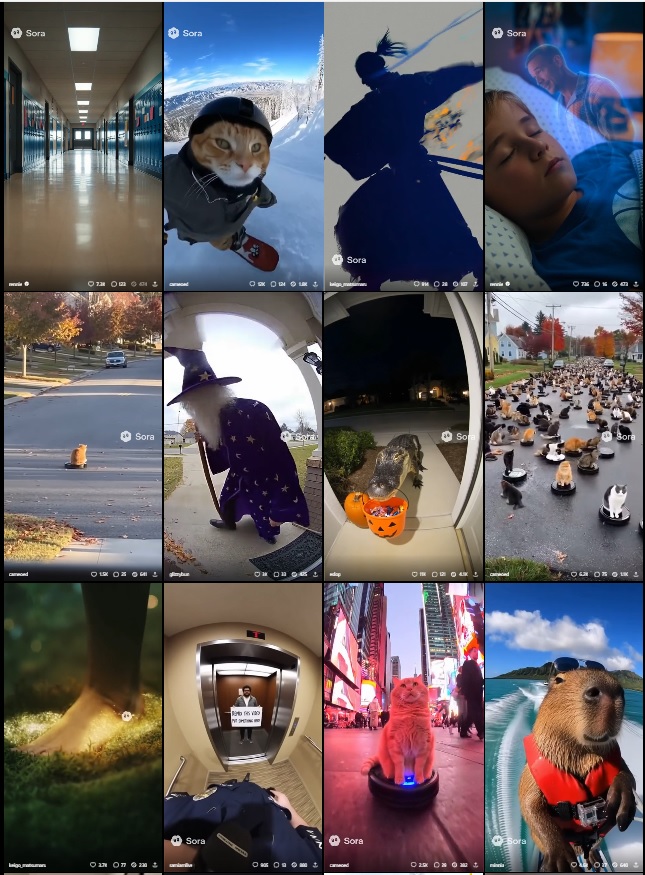
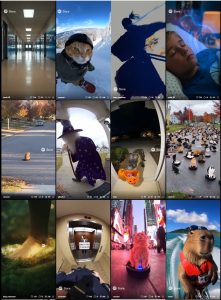
Video uploaded to the official website

■ Three Proposals for Effective Utilization

  1. Subject to the consent of the individual or creator
    AI-generated content must prioritize obtaining consent from the rights holders of the source material.
  2. Disclose the generation of content
    By explicitly stating “This video was generated by AI,” we maintain transparency and trustworthiness.
  3. Limited to use for educational, research, and expressive purposes
    Not for the purpose of faking, but solely as a “creative assistive technology.”

■ Summary: AI’s value changes based on “who uses it and how”

AI technology is evolving daily. “Hyper-realistic videos” like SORA2 expand creative possibilities while demanding new ethical frameworks for society as a whole. What’s required of us creators and businesses isn’t choosing “not to use” it, but adopting an attitude of designing “how to use it.” Rather than fearing AI, we should strive to understand it correctly and explore ways to utilize it for the future’s benefit.

Well then, stay tuned for the next blog post.

技術者ブログ-AIの活用~書籍で調べた時代からSORA2の衝撃まで~

技術者ブログとして日ごろ取り組んでいる学習内容をご紹介します。
今回は話題の動画生成ツールSora2の紹介です。

■ 書籍からAIへ──情報探索の進化
昔、技術を学ぶといえば本屋や図書館に通うものでした。分厚い専門書を読み込み、時間をかけて理解する時代。そこからインターネットの普及で「検索する」文化が生まれ、やがて“ググる”が当たり前に。
そして今──
人々は 「AIに聞く」 時代に突入しました。
たった数十年で、私たちの知識との付き合い方はここまで進化しています。

■ 皆さんはどう活用していますか?
ChatGPTや画像生成AI、音声合成ツールなど、「AIを触ってみた」という人は多いでしょう。私たち Dandelions Japan でも、ECサイト向けの動画制作にすでにAIを活用しています。映像生成の補助を取り入れることで、制作コストとスピードを大幅に改善しています。AIはもはや“研究”ではなく、“現場のツール”になりました。そして、今後はさらにその活用が加速していくでしょう。

■ SORA2がもたらす「本物そっくり動画」の衝撃
OpenAIが開発する 「SORA2」 は、テキストからリアルな動画を生成する技術です。静止画1枚から人物が自然に話したり、動いたりする映像を作れるレベルに到達しました。
たとえば、
 ・実際には存在しない“演説”動画
 ・撮影していない“ダンス”シーン
 ・亡くなった人物の写真をもとに“語りかける”ような映像
──これらが、ほんの数行のテキストで生成可能です。
技術的には驚異的ですが、同時に 著作権・肖像権の問題 が浮き彫りになっています。「本人の画像を元にしただけなのに、本人そっくりの映像が生成されてしまう」。現実と仮想の境界が、かつてないほど曖昧になってきています。

■ AI動画をどう活かすか?
この技術を正しく使えば、クリエイティブの幅は無限に広がります。
 ・教育・博物館分野での歴史再現
 ・手話や言語学習支援
 ・商品紹介・広告ムービーの効率化
 ・アーティストのバーチャル出演
私たちのECサイト「Dandelions Japan」でも、商品説明動画やイメージ映像に、AI生成を段階的に取り入れています。

公式サイトにアップロードされた動画

■ 有用的な活用のための3つの提案
 1.本人・制作者の同意を前提とする
  AI生成物は「素材の権利者の同意」を第一に考える。
 2.生成コンテンツの明示を行う
  「この映像はAIで生成されています」と明示することで、透明性と信頼性を保つ。
 3.教育・研究・表現のための活用に限定する
  フェイクを目的とせず、あくまで“創造的な支援技術”として使う。

■ まとめ:AIは“誰がどう使うか”で価値が変わる
AI技術は日々進化しています。SORA2のような「本物そっくり動画」は、創造の可能性を広げると同時に、社会全体に新しい倫理の枠組みを求めています。私たちクリエイターや事業者に求められるのは、「使わない」選択ではなく、「どう使うか」を設計する姿勢。AIを怖がるのではなく、正しく理解し、未来にとって“プラスになる活用”を模索していきたいですね。

では、次回のブログもお楽しみに。

Overview and Potential Applications of AI Agents

As an engineer’s blog, I’d like to share what I’m learning on a daily basis.
This time, the theme is AI Agents, which have been gaining significant attention in recent years.

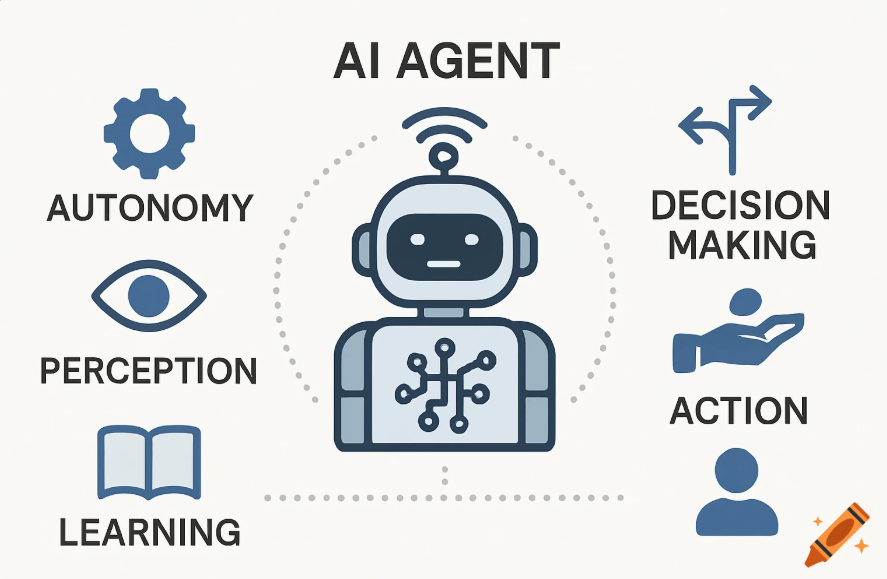
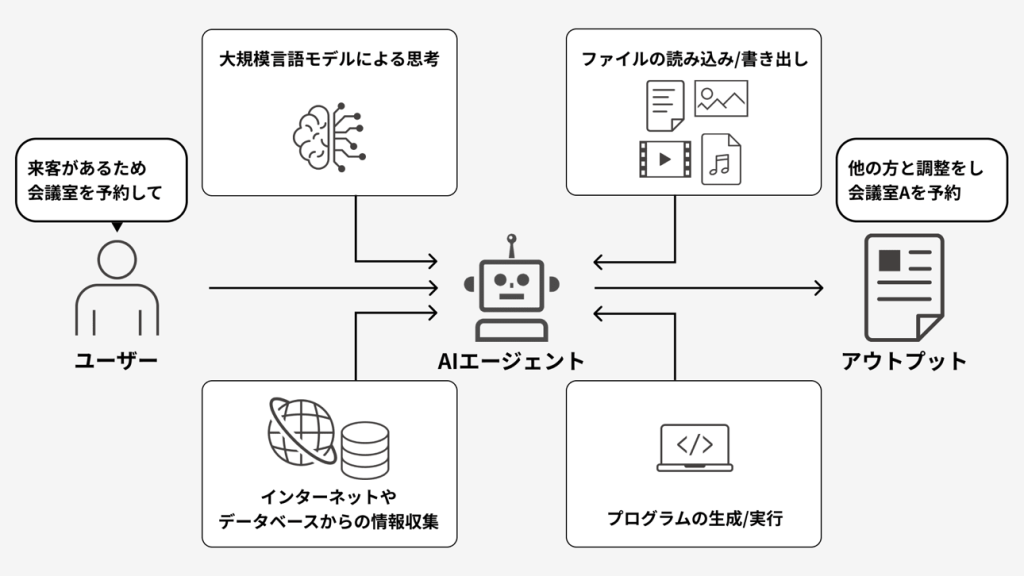
An AI Agent is an autonomous system capable of recognizing its surroundings, making judgments based on the situation, and taking action.
Unlike ordinary automation, its defining feature is the ability to flexibly handle tasks using learning and reasoning.
Recently, examples of incorporating AI Agents into work and system development using frameworks like ChatGPT and LangChain are increasing.

Translated with DeepL.com (free version)

1.Basic Elements of an AI Agent

The AI Agent consists of the following four elements.

  • Perception: Recognizing the environment and data (e.g., text analysis, sensor information)
  • Reasoning: Making decisions based on knowledge and rules
  • Action: Execute a task (e.g., API call, document generation)
  • Learning: Accumulating experience and improving

Traditional programs only performed predetermined tasks, but AI Agents can flexibly adapt their actions based on the situation.

2.Representative Frameworks

① LangChain

  • Features: Utilizes LLM (Large Language Model) to decompose and execute complex tasks.
  • Strengths: Easy API integration, enabling automatic combination of search, calculation, and information organization.
  • Usage examples: Document search agent, automated customer support responses.

② AutoGPT

  • Features: When a goal is set, it autonomously plans and executes multiple tasks.
  • Strength: Can determine next steps independently with minimal direction from others.
  • Use cases: Automating research tasks, drafting blog posts.

③ BabyAGI

  • Features: A compact autonomous agent that utilizes memory to continuously manage tasks.
  • Strengths: Simple and lightweight, suitable for personal use and small-scale projects.
  • Use cases: Daily to-do list management, automating information organization.

3.Use Cases

  • Software Development: Support from Requirements Definition to Test Automation
  • Business Operations: Streamlining customer support, scheduling, and research tasks
  • Daily Life: Smart Home Control, Learning Support

These are not merely “tools,” but are expected to be “partners” that collaborate with humans to achieve results.

4.Future Outlook and Challenges

Outlook: Advancement toward “multi-agent systems” where multiple AI agents collaborate to solve problems as a team.

Challenges: Reliability, security, and ethical concerns (risks of misinformation and excessive autonomy).

This time, we introduced the basics of AI Agents and their potential applications.
Next time, we plan to share our hands-on experience building an AI Agent using LangChain and having it perform simple tasks, along with our impressions of using it. We’ll include code examples and results to explain, based on our experience, how it can be applied to business operations.
If you’re interested in AI Agents, be sure to tune in next time.

AI Agentの概要と活用可能性

技術者ブログとして日ごろ取り組んでいる学習内容をご紹介します。
今回は、近年注目を集めている AI Agent をテーマにしています。

AI Agentは、周りの環境を認識し、その状況に合わせて判断し、行動できる自律的なシステムです。
普通の自動化とは違い、学習や推論を使って柔軟にタスクをこなせるのが特徴です。
最近は、ChatGPTやLangChainなどのフレームワークを使って、仕事やシステム開発に取り入れられる例が増えています。

1. AI Agentの基本要素

AI Agentは以下の4つの要素から構成されます。

  • 知覚 (Perception):環境やデータを認識する(例:テキスト解析、センサー情報)
  • 推論 (Reasoning):知識やルールをもとに意思決定する
  • 行動 (Action):タスクを実行する(例:API呼び出し、ドキュメント生成)
  • 学習 (Learning):経験を蓄積し改善していく

従来のプログラムでは決められた処理を行うだけでしたが、AI Agentは状況に応じて行動を柔軟に変化させることが可能です。

2. 代表的なフレームワーク

① LangChain

  • 特徴:LLM(大規模言語モデル)を活用し、複雑なタスクを分解・実行できる。
  • 強み:API連携が容易で、検索・計算・情報整理などを自動で組み合わせ可能。
  • 利用例:ドキュメント検索Agent、カスタマーサポートの自動応答。

② AutoGPT

  • 特徴:目標を設定すると、複数のタスクを自律的に計画・実行。
  • 強み:人の指示が少なくても、自分で次の行動を決定できる。
  • 利用例:リサーチ業務の自動化、ブログ記事の下書き作成。

③ BabyAGI

  • 特徴:小型の自律エージェントで、メモリを活用しタスクを継続的に管理。
  • 強み:シンプルかつ軽量、個人利用や小規模プロジェクトに向いている。
  • 利用例:日常的なToDo管理、情報整理の自動化。

3. 活用事例

  • ソフトウェア開発:要件定義からテスト自動化までの支援
  • ビジネス業務:顧客対応、スケジューリング、リサーチ業務の省力化
  • 日常生活:スマートホーム制御、学習サポート

これらは単なる「ツール」ではなく、人間と協力して成果を出す「パートナー」として期待されています。

4. 今後の展望と課題

展望:複数のAI Agentが協調し、チームのように問題解決を行う「マルチエージェントシステム」への発展。

課題:信頼性、セキュリティ、倫理面(誤情報や過剰自律性のリスク)。

今回は、AI Agentの概要と活用可能性についてご紹介しました。
次回は、実際に LangChainを用いてAI Agentを構築し、簡単なタスクを実行させてみた体験談や使用感 をお伝えしたいと思います。コード例や動作結果も交えながら、「どのように業務に応用できるか」を体験ベースで解説する予定です。

AI Agentに関心のある方は、ぜひ次回もご覧ください。

Engineer Blog – Creating a Discord BOT (Free 24/7 Operation)

I introduce the learning topics I’m working on daily in my engineer blog. Recently, I personally created a Discord bot and successfully ran it for free, 24/7, so I’d like to share that experience with you this time.

What’s Discord?

Before diving into the main topic, let me give a brief overview of Discord. Discord is a communication service developed in the United States that supports text, voice, and video interactions. I mainly use it as a call app while working.

Here are the main features of Discord (only those relevant to the main topic have been extracted)

◆ Server
A server is a feature similar to group chats, allowing multiple users to interact through text chats and voice communication. Servers are categorized into Open Servers (which can be made publicly available through application, searchable within Discord, or announced on bulletin sites for recruiting members) and Private Servers (accessible only by invitation unless applied for).

◆ Text
Channel This is a group chat feature within a server where members can communicate with each other through text.

◆ Voice
Channel This is a group call feature within a server, allowing members in the channel to communicate and share their screens.

◆ BOT
By introducing a BOT, you can enhance the functionality of your server. Inviting publicly available BOTs allows you to add useful features like music playback, text-to-speech, timers, and schedule management. You can also invite and operate your own custom-made BOT.

From Creating to Operating a BOT

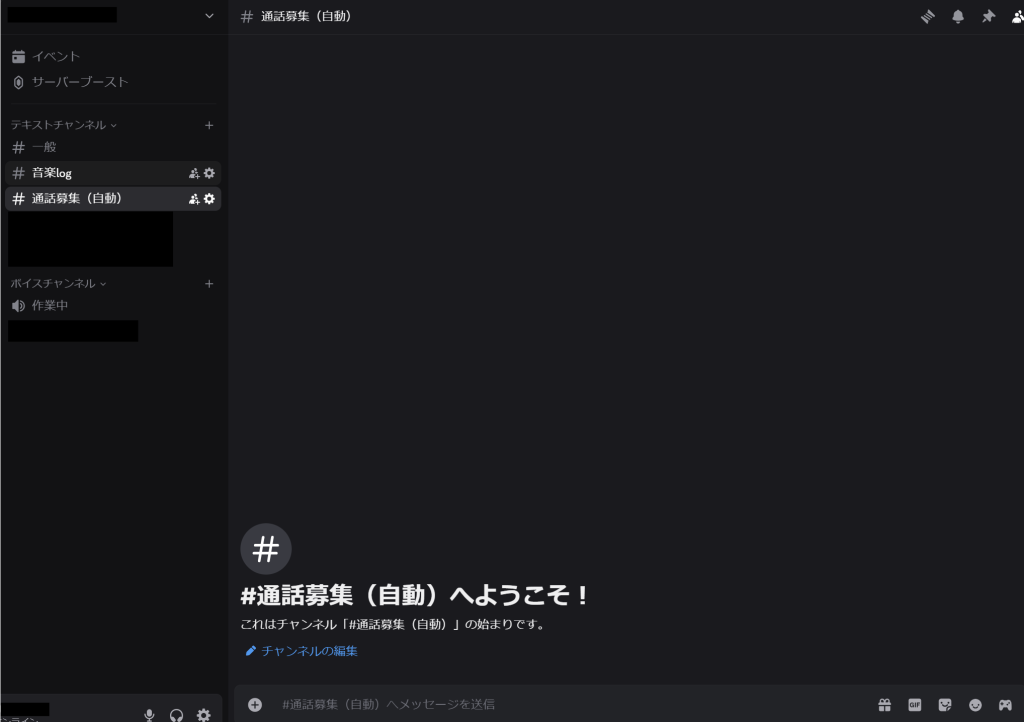
The BOT I created this time is a ‘Voice Channel Entry Notification BOT’ for private servers.

◆ Inspiration
In Discord, when someone enters a voice channel, there is no built-in feature to notify other server members. As a result, someone might be waiting without realizing they’re working alone. That’s when I thought, ‘Wouldn’t it be useful to have a BOT that sends notifications for channel entries?’ And so, I decided to create one.

◆ Implementation Details
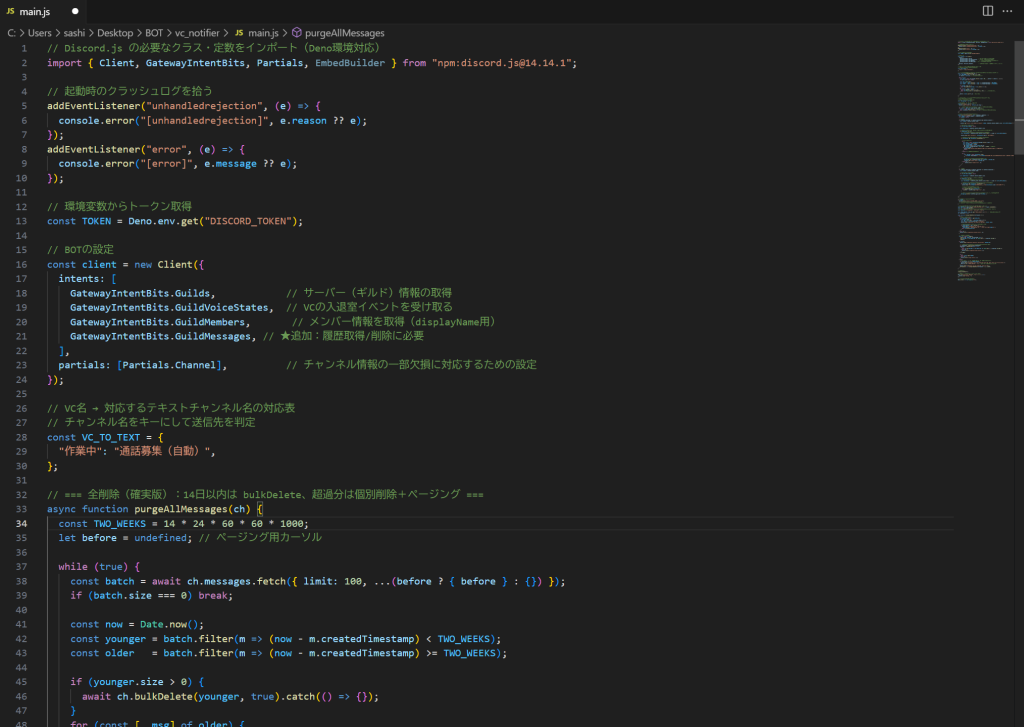
①Determine the BOT’s features and coding
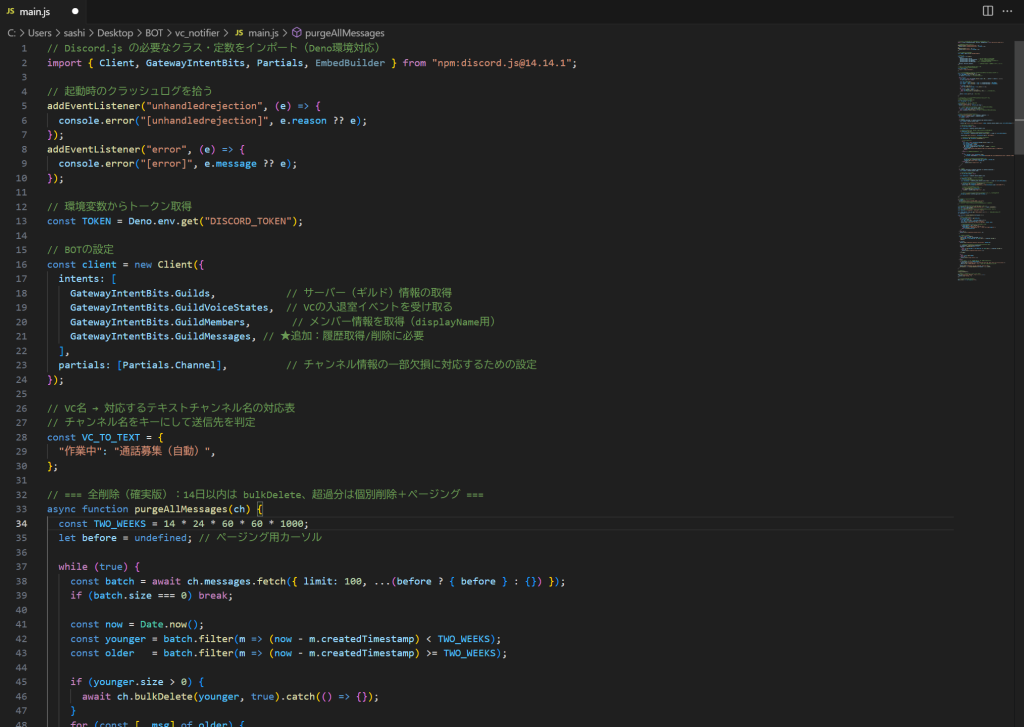
Create a main.js file in JavaScript to align with sites that allow free 24/7 BOT operation.

Features included:

  • When the number of users in the ‘Working’ voice channel changes from 0 to 1, automatically send a recruitment message to the ‘Call Recruitment (Auto)’ text channel.
  • If the number drops from 1 to 0, delete the recruitment messages previously sent to ‘Call Recruitment (Auto)’ entirely.
  • From 1 to 2 or more users, no recruitment messages are sent to ‘Call Recruitment (Auto)’.

Below is part of the actual coding.

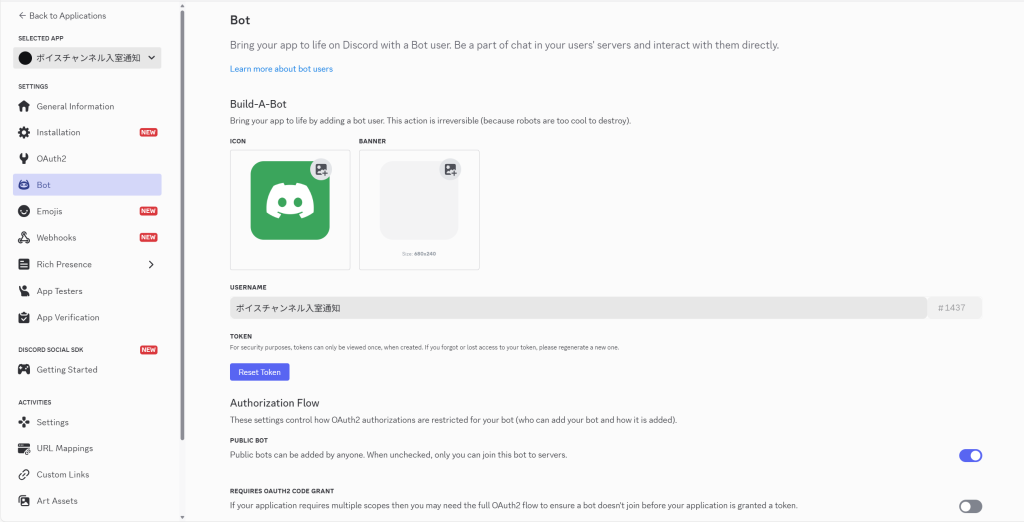
② Create a BOT Account on Discord Developer Portal
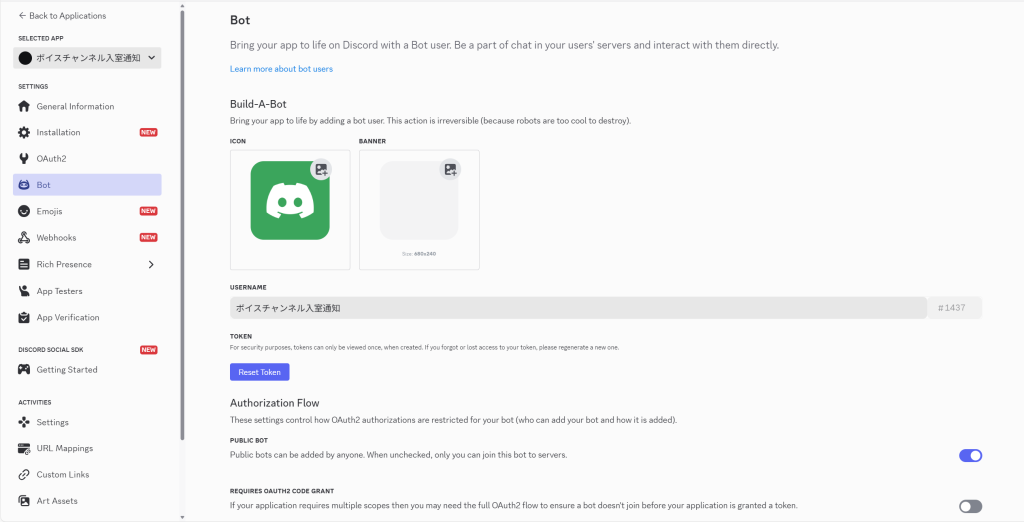
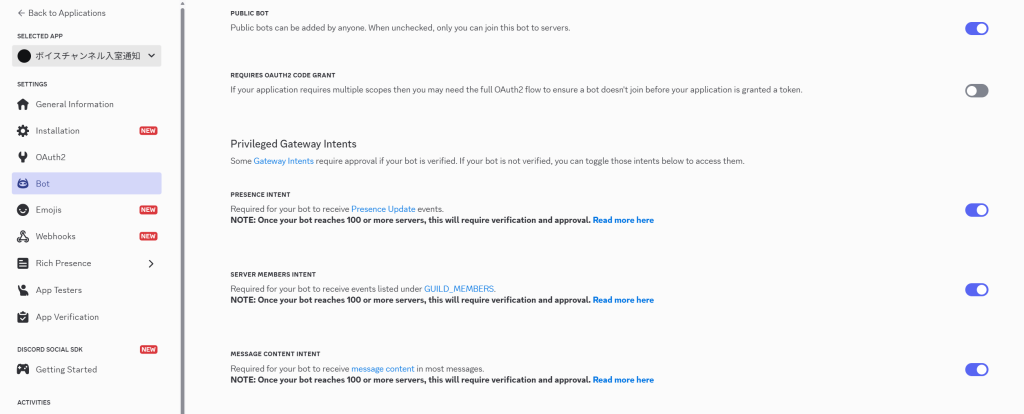
Access the Discord Developer Portal, create a BOT account from ‘New Application,’ and obtain the token.

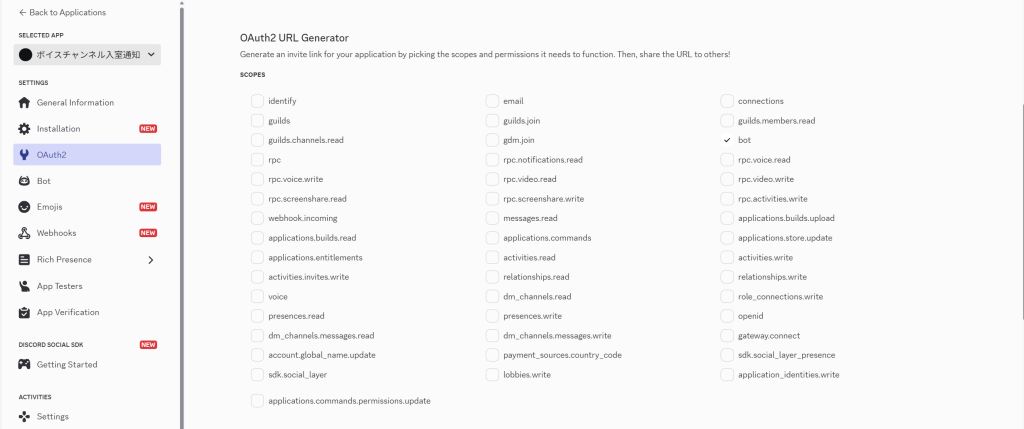
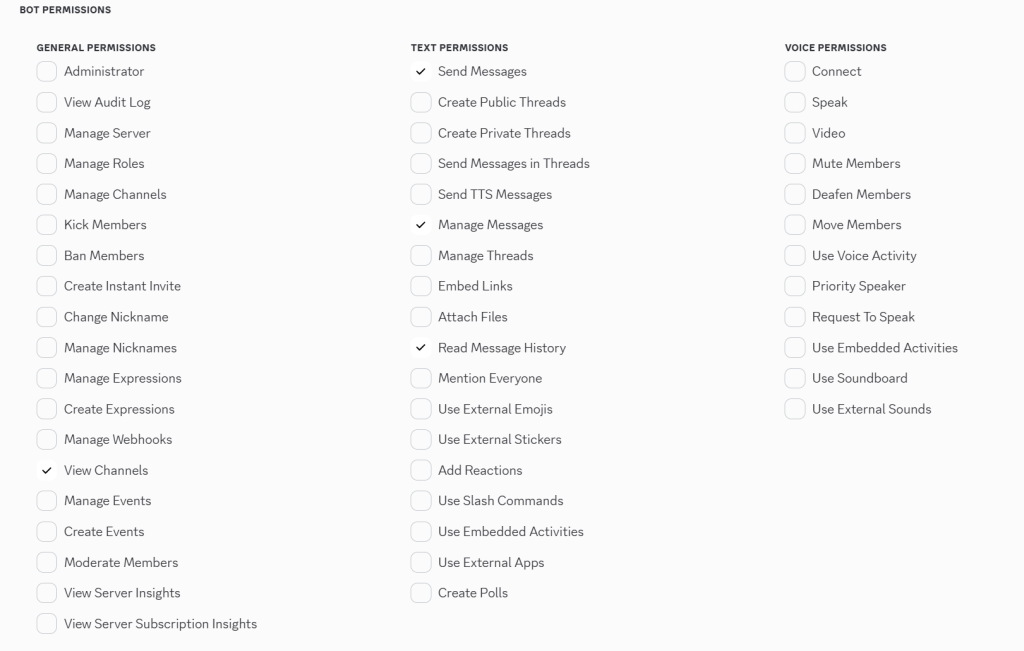
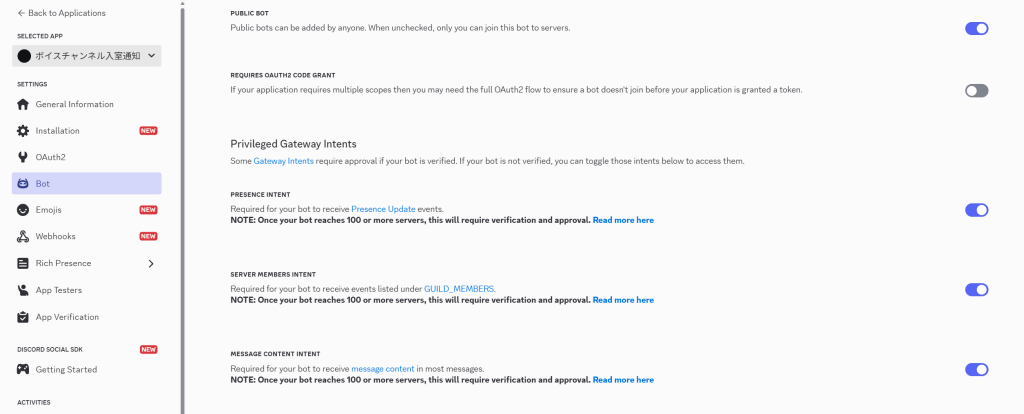
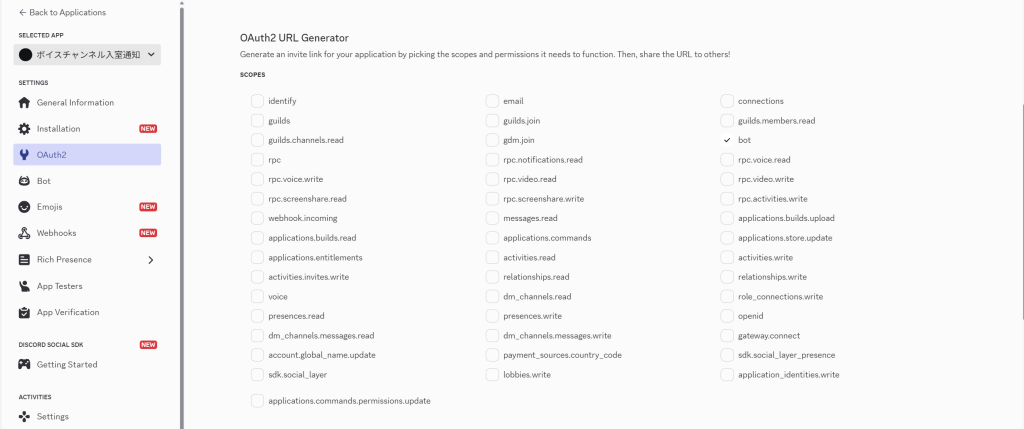
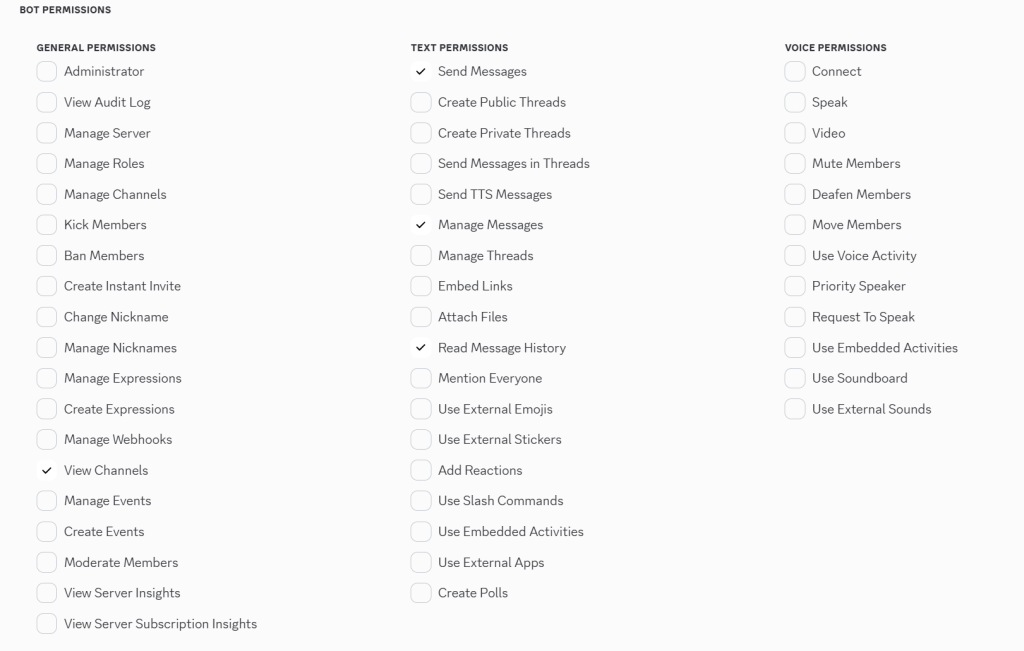
Enable the following in the BOT’s permission settings.

After configuring the BOT’s permissions, invite the BOT to your server using the generated URL.

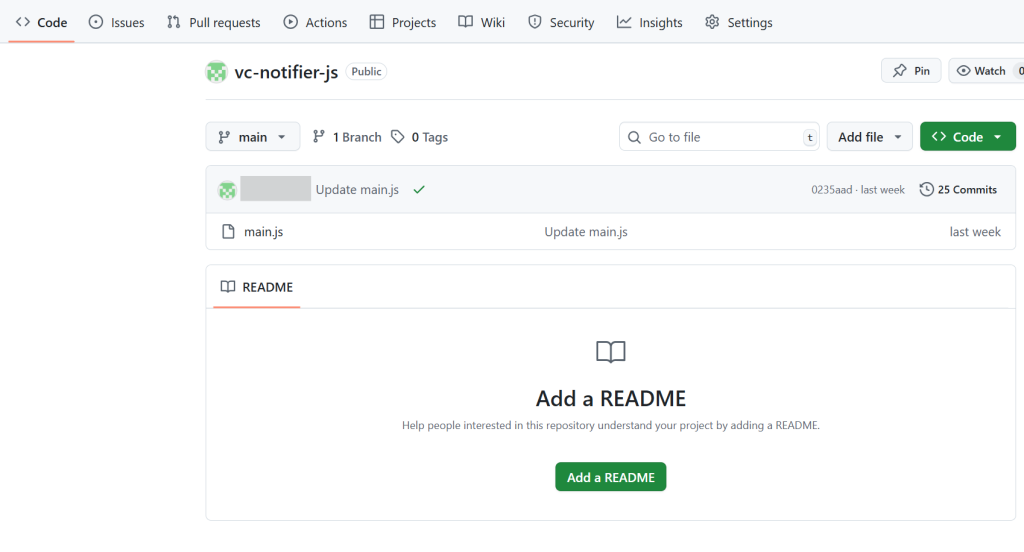
③ Create a Repository on GitHub and Upload the Source Code
I used Git, which I’ve previously introduced on my engineer blog and discussed during an internal workshop.
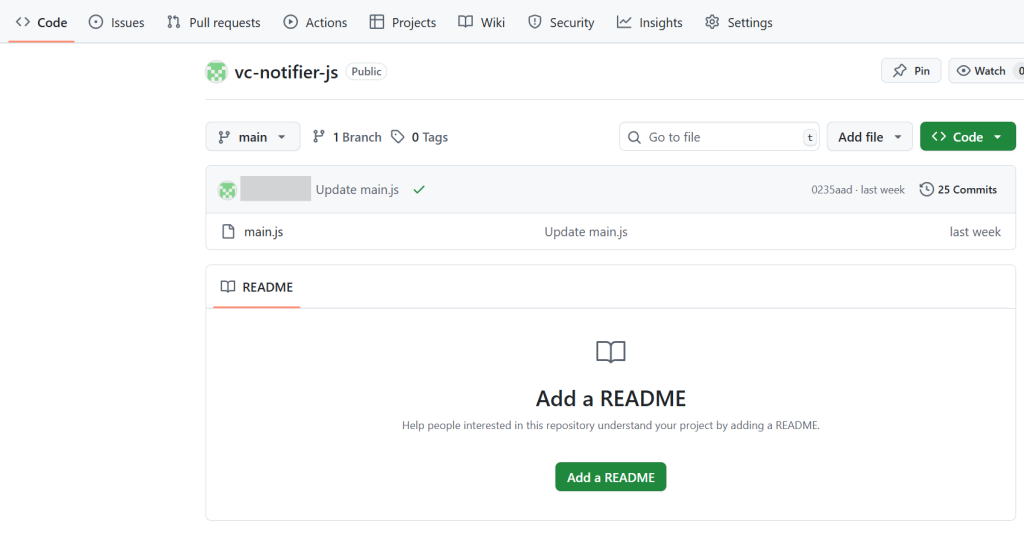
Create a repository on GitHub and upload the source code.

④ Link Deno.deploy with GitHub and Log In
Create a project in Deno.deploy and import the repository created on GitHub.
Set the token obtained in step ② as an environment variable.

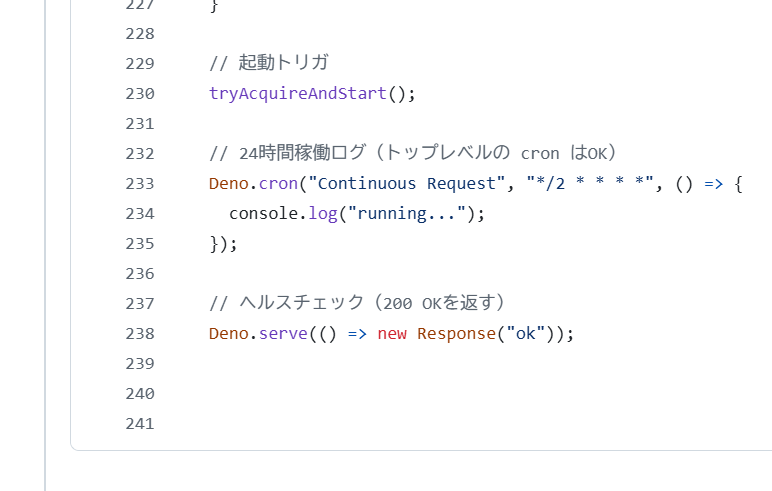
⑤ Add Deno.cron at the End of the Source Code to Enable 24/7 Operation
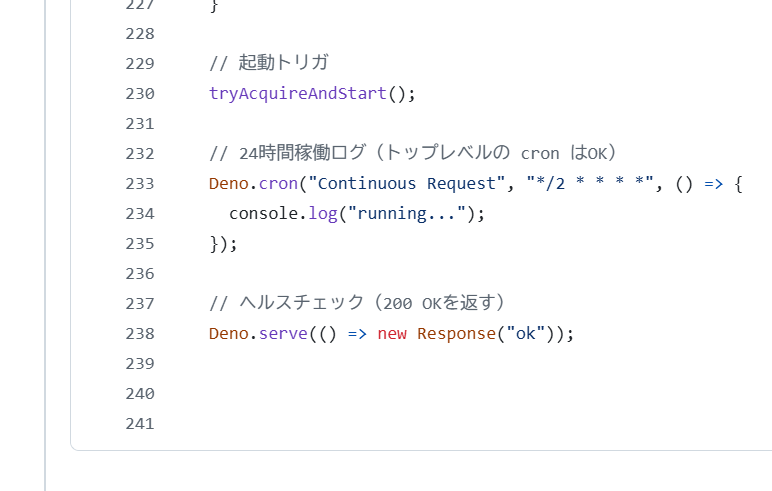
To ensure the BOT doesn’t stop, add a periodic process (Cron job) at the end of the source code that performs light operations every 2 minutes on Deno.deploy..
This allows the BOT to operate 24/7.

⑥ Test on the Discord Server
Enter the voice channel and check if it operates as expected.

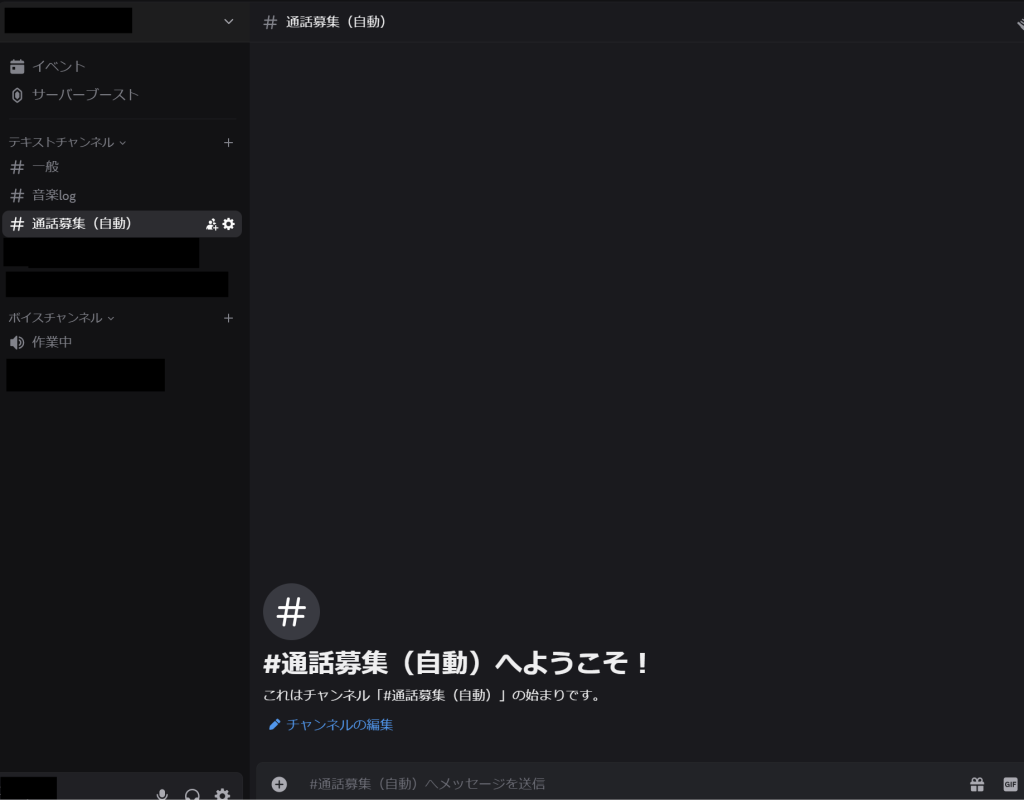
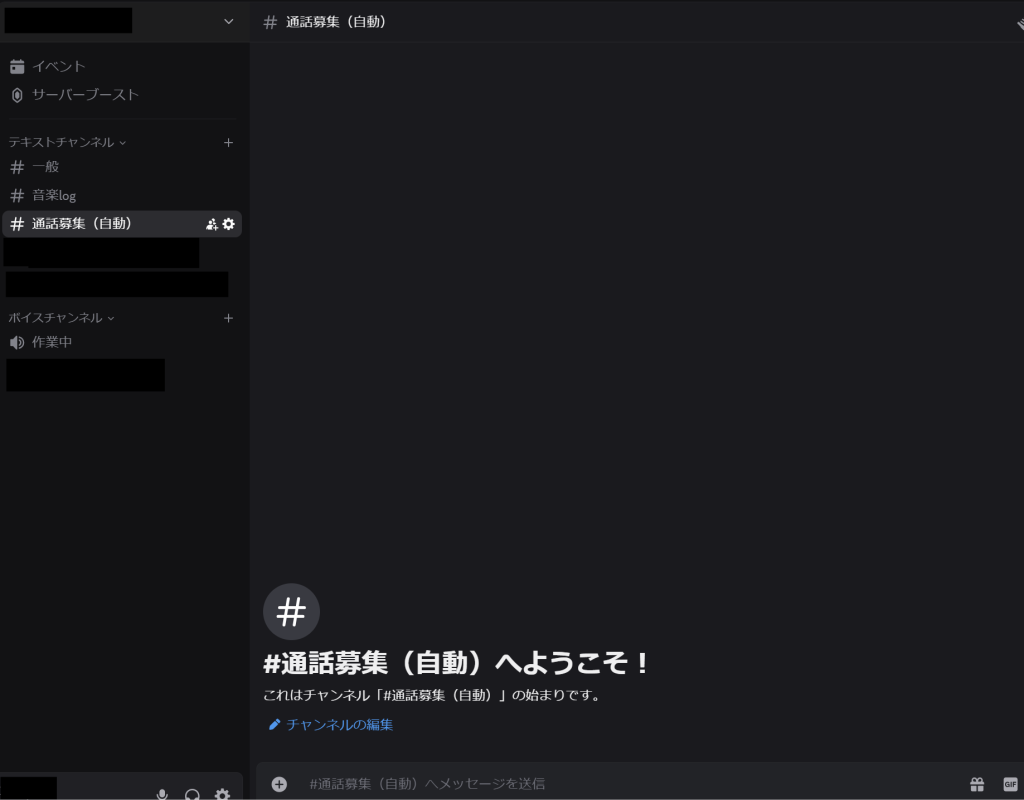
When the voice channel has no members, the text channel has no messages.
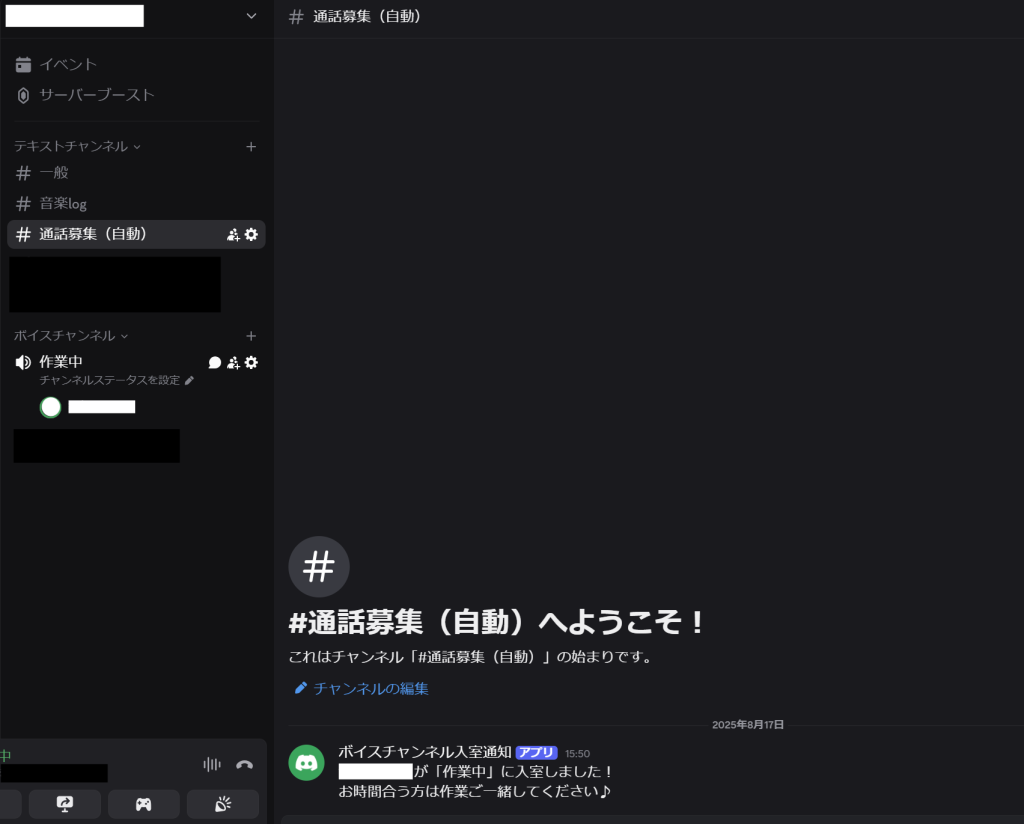
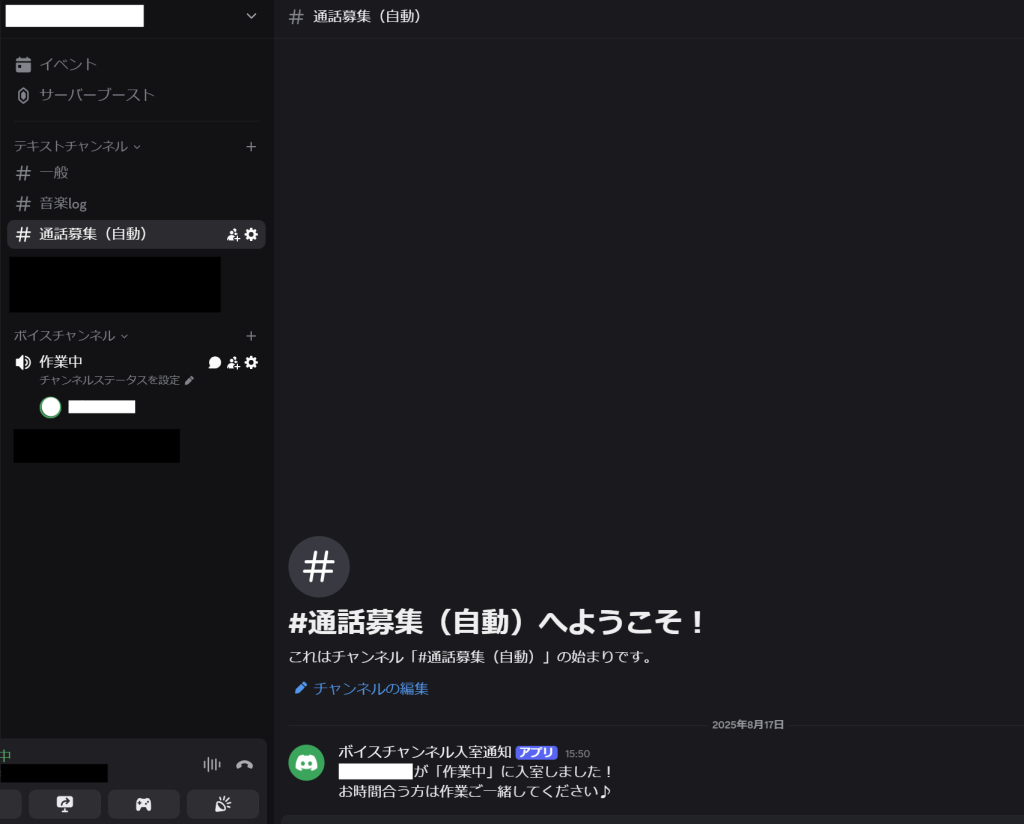
When you join the voice channel and the number of members in the voice channel changes from 0 to 1, a call recruitment message is sent to the text channel.
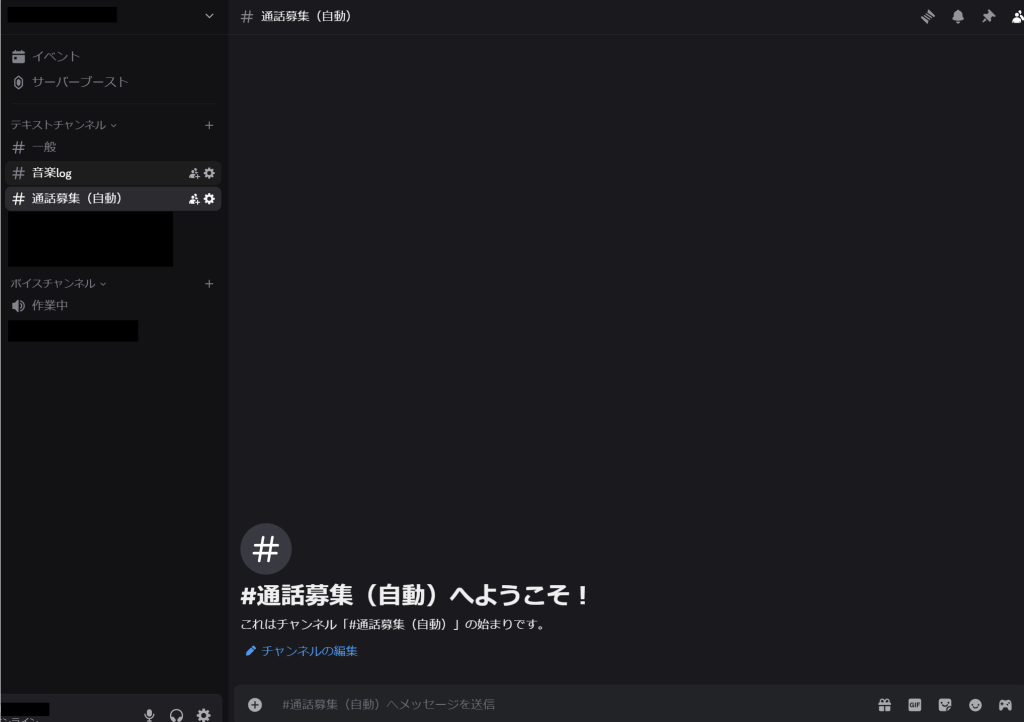
When you leave the voice channel and the number of members in the voice channel decreases from 1 to 0, the message in the text channel is automatically deleted.

It has been confirmed to be working as expected, so it will be completed once the BOT is checked to ensure it is not offline the next morning.

That wraps up the discussion on creating a Discord BOT and achieving free 24-hour operation.

Stay tuned for the next technical blog

技術者ブログ-Discord BOT作成(無料での24時間稼働まで)

技術者ブログとして日ごろ取り組んでいる学習内容を紹介します。
最近個人的にDiscordのBOTを作成し、無料での24時間稼働に成功したので今回はそちらについてご紹介します。

Discordとは

本題に入る前に、まずDiscordについて簡単に説明します。
Discordはアメリカで開発されたテキスト・ボイス・ビデオでコミュニケーションが取れるサービスです。
私は主に作業時の通話アプリとして利用しています。

Discordの主な機能は以下のとおりです。(本題に関係する部分のみ抜粋します)

◆サーバー
サーバーとはグループチャットのような機能です。複数のユーザーとテキストチャットや音声でやり取りができます。
サーバーには オープンサーバー(申請してDiscord内検索や掲示板サイトでサーバーを公開し、メンバー募集できる)と、プライベートサーバー(申請しない限り招待制で利用する)があります。

◆テキストチャンネル
サーバー内のグループチャット機能です。メンバー同士でテキストのやり取りができます。

◆ボイスチャンネル
サーバー内のグループ通話機能です。入室したメンバー同士で会話や画面共有ができます。

◆BOT
BOTを導入すると、サーバーの機能を拡張できます。公開されているBOTを招待すれば、音楽再生・テキスト読み上げ・タイマー・予定調整など、便利な機能を追加できます。
また、自作BOTを招待して動かすことも可能です。

BOT作成から稼働まで

今回作成したのは、プライベートサーバー向けの 「ボイスチャンネル入室通知BOT」 です。

◆きっかけ
Discordでは、ボイスチャンネルに入室してもサーバーメンバーに通知が行かない仕様のため、誰かが待機していても気付かずに一人で作業してしまうことがありました。
そこで「入室を通知してくれるBOTがあれば便利なのでは」と考え、作成することにしました。

◆実施内容
①BOTの機能を決めてコーディング
BOTを24時間無料で稼働させることができるサイトに合わせて、JavaScriptでmain.jsファイルを作成します。

機能としては以下を入れています。
・「作業中」ボイスチャンネル内の人数が0人から1人になった時のみ「通話募集(自動)」テキストチャンネルに通話募集のメッセージ送信
・1人から0人になったら「通話募集(自動)」に送信されていた通話募集メッセージを全削除
・1人から2人以降は「通話募集(自動)」に通話募集のメッセージを送信しない

以下は実際のコーディングの一部です。

②Discord Developer PortalにBOTアカウントを作成
Discord Developer Portalにアクセスし、New ApplicationからBOTアカウントを作成し、トークンを取得します。

BOTの権限設定で以下を有効にします。

BOTの権限を設定したら生成されたURLからBOTをサーバーに招待します。

③GitHubにリポジトリを作成し、ソースをアップロード
以前技術者ブログでも紹介したことがあり、社内勉強会でも触ったことのあるGitを使用しました。
GitHubにリポジトリ作成をしてソースをアップロードします。

④Deno.deployとGitHubを連携してログイン
Deno.deployの中でプロジェクトを作成し、GitHubで作成したリポジトリをインポートします。
②で取得したトークンをEnvironment variablesに設定します。

⑤ソースの最後の方にDeno.cronを記載し、24時間稼働させる
BOTが止まらないように2分ごとにDeno.deploy上で軽く動作させるための定期処理(Cronジョブ)をソースの最後の方に記載します。
これで24時間BOTが稼働してくれるようになります。

⑥Discordサーバーでテスト
実際にボイスチャンネルに入室して想定通りに動くか確認します。

ボイスチャンネルに0人の状態。テキストチャンネルにはメッセージがない状態です。
ボイスチャンネルに入室してボイスチャンネルの人数が0人から1人になるとテキストチャンネルに通話募集のメッセージが送信されます。
ボイスチャンネルから抜けて、ボイスチャンネル内の人数が1人から0人になるとテキストチャンネルのメッセージが自動で削除されます。

想定通りに動くことが確認できたので、翌朝BOTがオフラインになってないか確認したら完了です。

以上、長くなってしまいましたが、DiscordのBOT作成から無料での24時間稼働まででした。

次回の技術者ブログをお楽しみに。

Engineer Blog: (Outsystems) Calling External APIs

Let us introduce the learning topics we work on daily as part of our engineer blog. This time, it’s Team 2, focusing on low-code development!

This time’s theme: (Outsystems) Calling External APIs

In Outsystems, there are several ways to use externally published APIs. This time, we’ll focus on introducing the method for calling REST-style APIs.

The API we will use this time

This time, we’ll use an example of calling ‘Completions,’ one of the APIs provided by OpenAI (link: API reference). It’s the API that powers ‘ChatGPT,’ enabling the functionality where users send a request and the AI responds with a written answer. Many of you might have seen or used it before, haven’t you?

Implementation Example

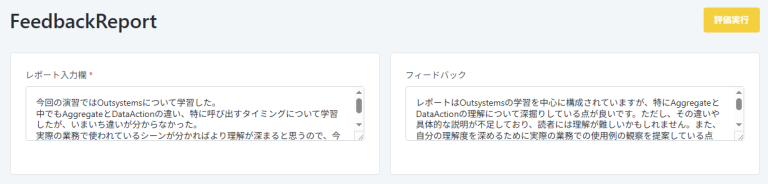
This time, we used this API to create a feature where AI evaluates Japanese reports submitted by users and provides feedback on the content, including assessments and suggestions for improvement.

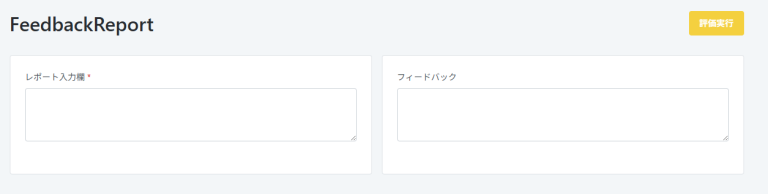
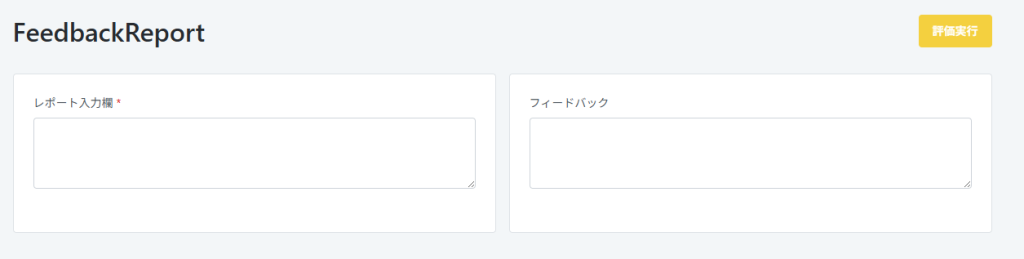
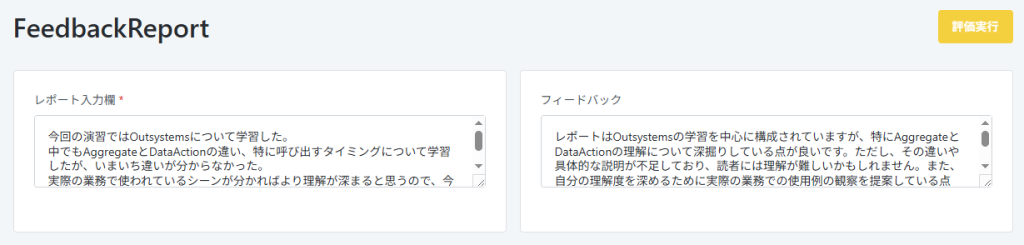
The layout of the API execution screen

The layout is quite simple: users input text into the ‘Report Input Field’ on the left side of the screen. By pressing the ‘Evaluate’ button, evaluation results and improvement feedback are displayed in the ‘Feedback’ section on the right.

Action upon pressing the button
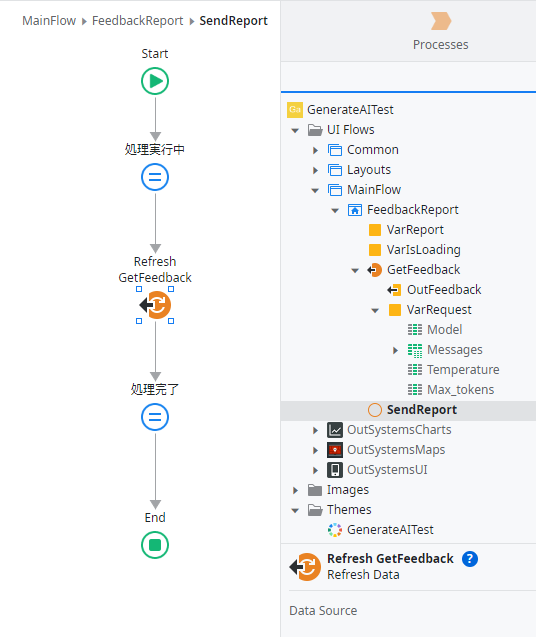
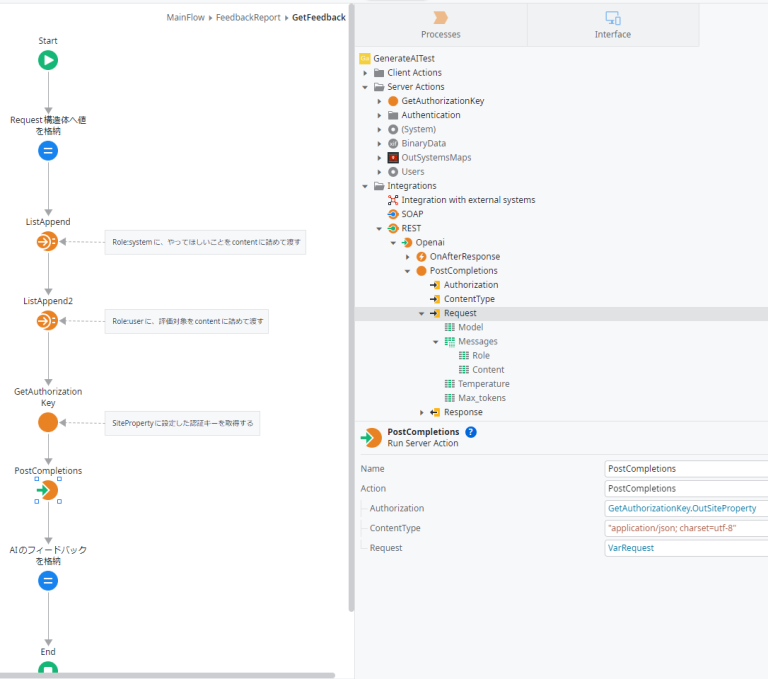
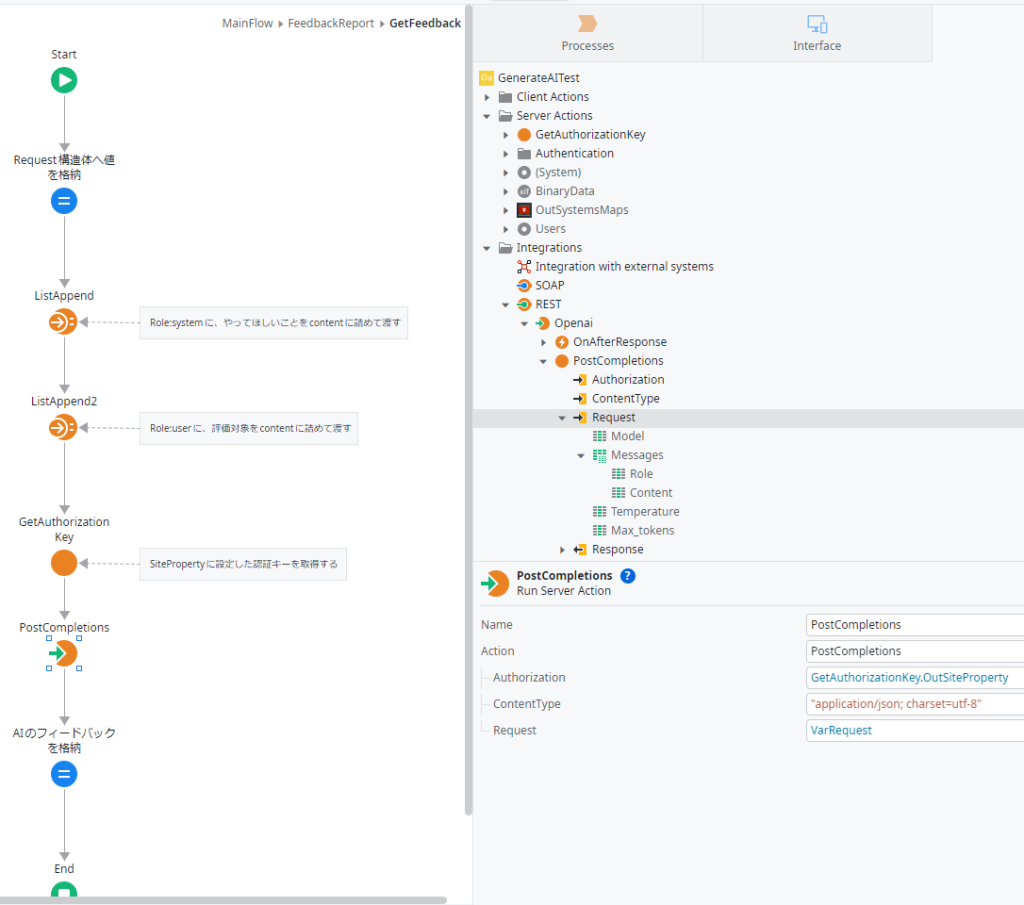
”GetFeedback” Action

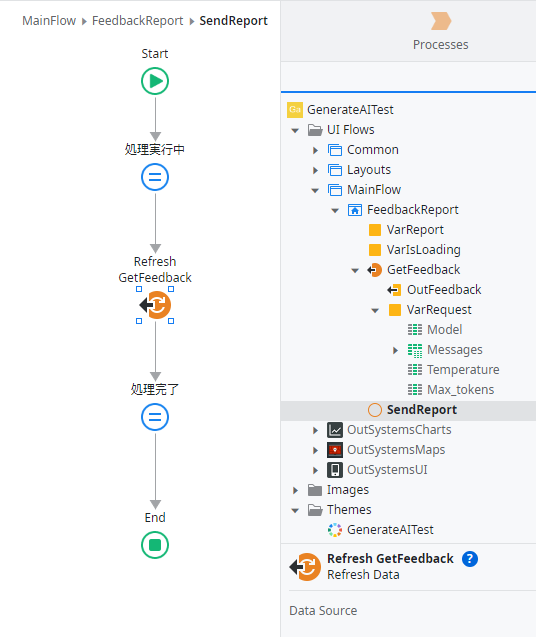
The process upon pressing the button involves re-executing the REST API set within the Data Action. The flow includes setting parameters for the request required for API execution and then executing the API itself. So, how do you configure the API request here? By providing a sample request in Outsystems, it automatically generates the necessary configuration. Below, we’ll explain further with images.

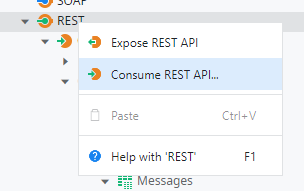
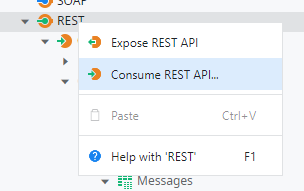
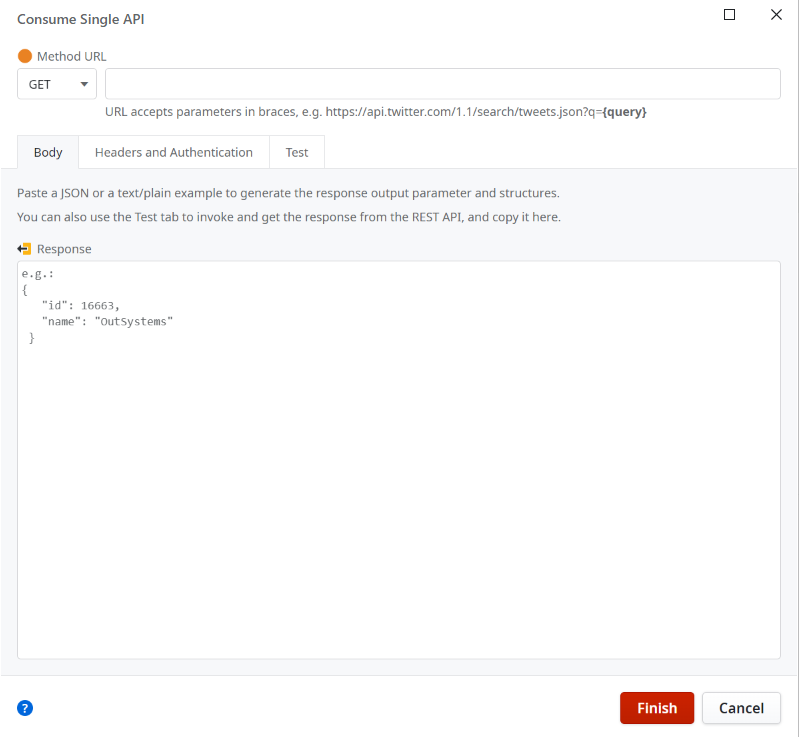
Display the REST context menu. Here, select ‘Consume REST API…
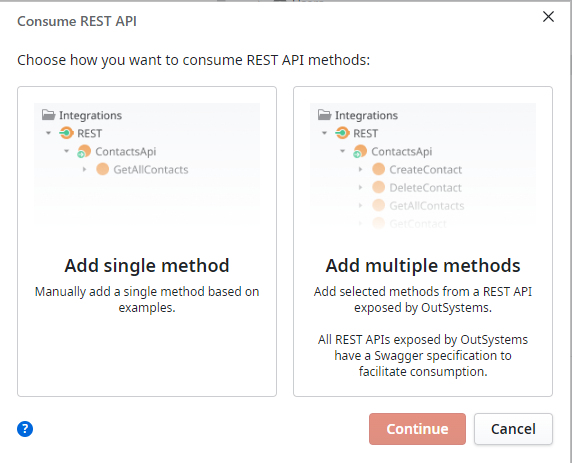
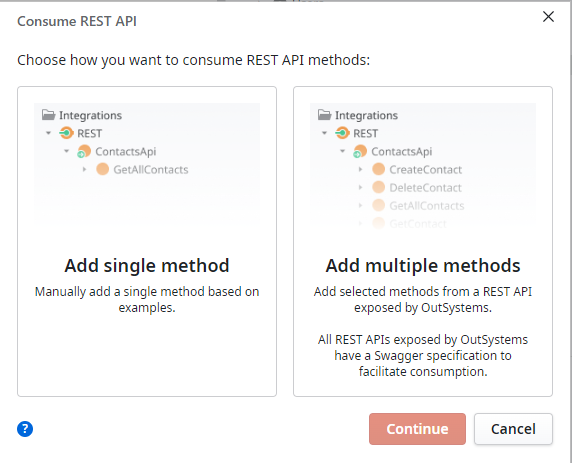
This time, select ‘Add single method.’
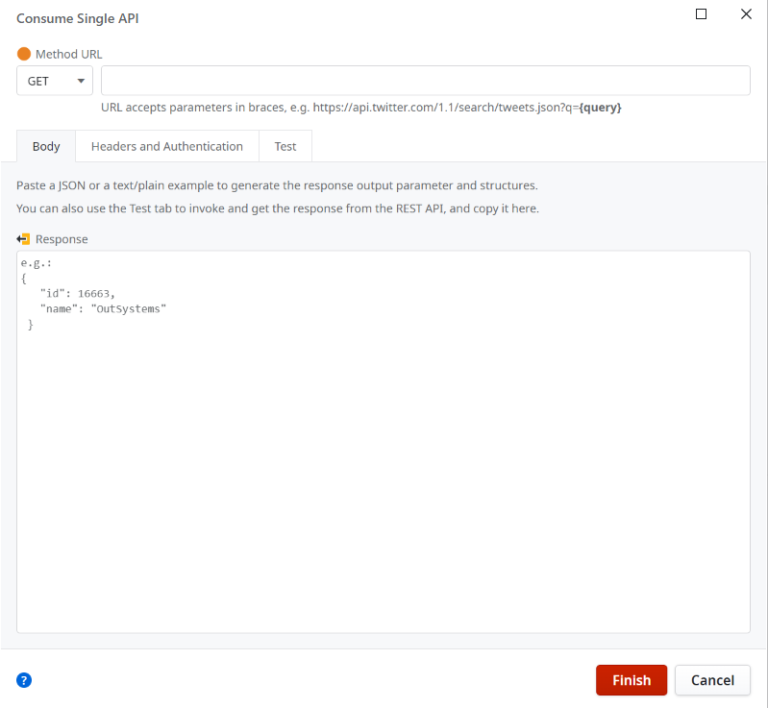
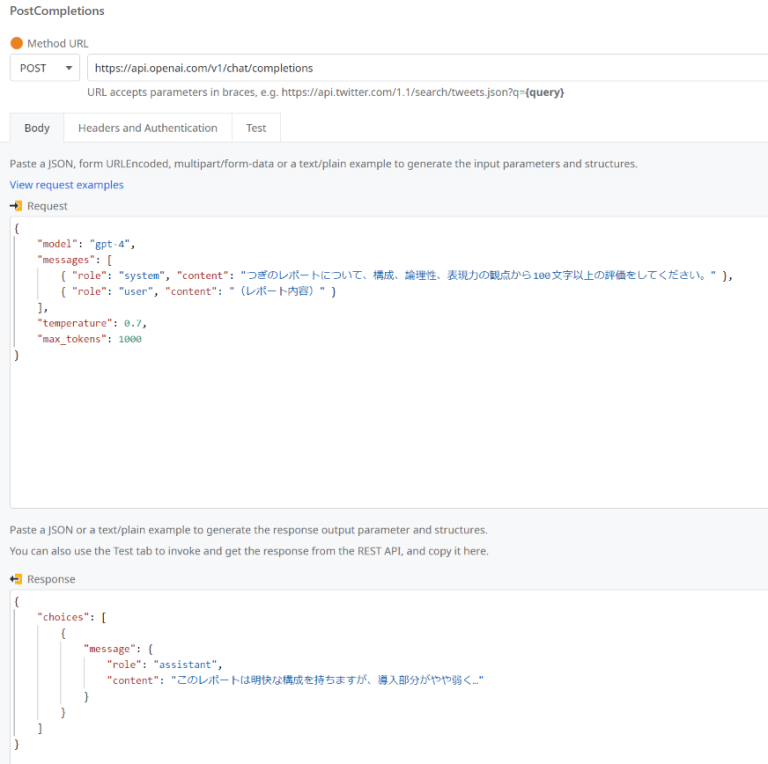
A screen to configure the desired REST URL and request/response samples. Here, set up the request/body based on the API Reference provided in the previously mentioned ‘Completions’ link.
Example of Body Configuration
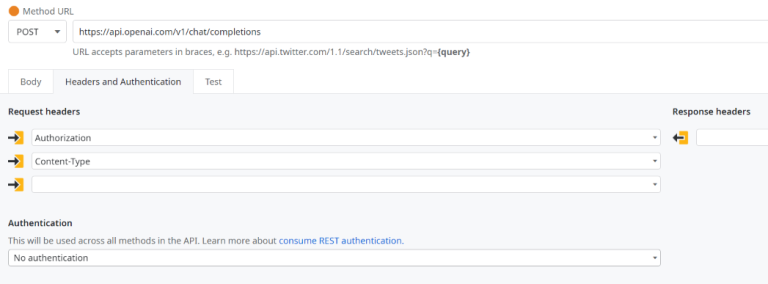
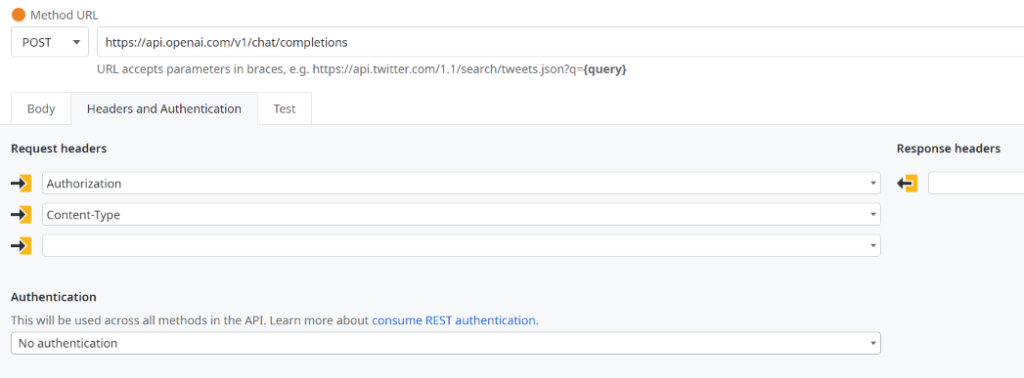
Example of Header Configuration
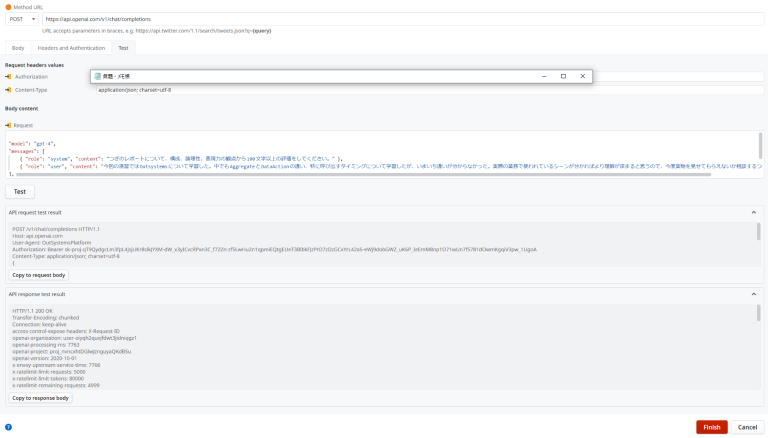
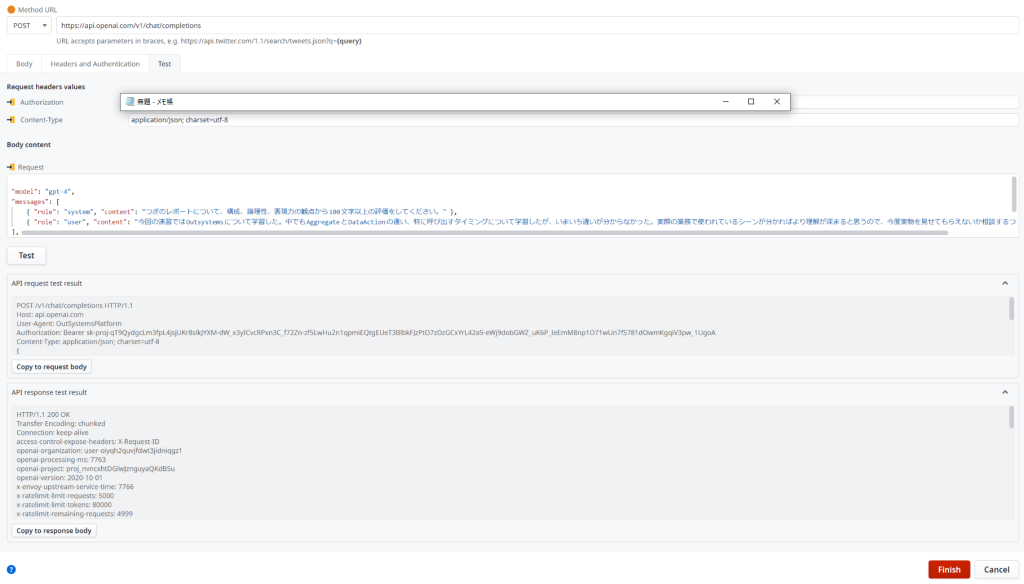
Using the body and header input details, input test data and perform a test run to confirm the request and response results. If there are no issues, press the ‘Finish’ button to automatically generate the main action and the necessary data structure for the request and response.

Once this is done, you can simply configure it as you would typically build logic in Outsystems: place the created REST API as an action in the flow, set the necessary inputs, and handle the return values to complete the API call.

Execution example: Feedback is returned for the entered report.

Summary

How was it? With the URL of a publicly available API and its reference, you can call it from Outsystems just like a regular action. However, be aware that publicly available APIs might have usage fees, limitations on the number of calls, or data capacity restrictions. So, please plan your usage carefully…

Team 2 will continue to share engineer blogs using low-code tools like Outsystems in the future, so stay tuned!

技術者ブログ:(Outsystems)外部APIを呼び出す

技術者ブログとして日ごろ取り組んでいる学習内容をご紹介します。
今回は、ローコード開発をテーマにしている第2チームです。

今回のテーマ:(Outsystems)外部APIを呼び出す

Outsystemsでは、いくつかの方法で外部公開されているAPIを利用することができます。
今回は、その中でも特にREST形式のAPIを呼び出す方法について紹介します。

今回使用するAPI

今回は、OpenAIが提供しているAPIの一つである”Completions“(リンク先:APIのリファレンス)を呼び出す場合を例として挙げます。
いわゆる”ChatGPT”が提供している、「リクエストを投げることで、AIがそのリクエストに対する回答を文章形式で返してくれる」機能を実現するためのAPIです。
皆様も一度は目にしたり、利用した経験があるのではないでしょうか?

実装例

今回は、本APIを使用して「ユーザーが入力した日本語レポートについて、AIによる評価を行わせ、内容に対する評価や改善点のフィードバックを受け取る」機能を作成しました。

API実行画面の構成

画面の構成としては至ってシンプルで、画面左の「レポート入力欄」にテキストを入力し、評価実行ボタンを押下することで、画面右の「フィードバック」欄に評価や改善点のフィードバックが表示される、といったものになります。

ボタン押下時のアクション
“GetFeedback”アクション

ボタン押下時の処理は、DataActionに設定したREST APIの再実行になります。
API実行に必要となるリクエストにパラメータを設定し、API本体を実行する、という流れです。
では、ここでどのようにAPIのリクエストを設定するのかというと、Outsystemsにリクエストのサンプルを記載してやることで自動的に生成してくれます。
以下、画像にて説明をしていきます。

RESTのコンテキストメニューを表示。ここで”Consume REST API…”を選択。
今回は”Add single method”を選択します。
呼び出したいRESTのURL、およびリクエスト/レスポンスのサンプルを設定する画面。
ここに先述の”Completions”リンクに記載のAPI Referenceを参考に、リクエスト/ボディを設定する。
ボディの設定例
ヘッダの設定例
ボディ・ヘッダの入力内容を元に、テストデータを入力してテスト実行することで、リクエスト・レスポンスのテスト結果を確認できる。
内容に問題が無ければ”Finish”ボタンを押下することでアクション本体、およびリクエスト・レスポンスに必要なデータ型(Structure)が自動生成される。

ここまでできれば、後は通常のOutsystemsでロジックを組む場合と同様に、作成されたREST APIをアクションとしてフローに配置し、必要なインプットを設定、戻り値を処理するだけで呼び出しが実現できます。

実行例。入力したレポートに対するフィードバックが返されている。

まとめ

いかがでしたでしょうか?
実際に公開されているAPIのURLと、APIのリファレンスがあれば、このようにOutsystemsから通常のアクションと同じように呼び出すことができます。
ただし、一般に公開されているAPIについては使用料金を設定していたり、回数や容量に制限を設けていたりする場合があります。
くれぐれもご利用は計画的に…。

第2チームでは、これからもOutSystemsなどのローコードツールを使った技術者ブログを展開していきますのでお楽しみに!

Engineer’s Blog: The Future of Medicine Pioneered by AI – Breakthroughs in Drug Discovery and Protein Folding

In this engineer’s blog, we explore the latest AI technologies impacting the field of medicine. In recent years, advances in artificial intelligence (AI) have made a significant mark on healthcare. Among the most notable developments are in drug discovery and protein folding. These areas are critical for understanding disease mechanisms and developing new drugs, and the introduction of AI has brought about major breakthroughs.

1. The Intersection of AI and Biology

The power of AI is transforming traditional methods in biological research. Proteins are fundamental building blocks of life, and understanding their three-dimensional structures is essential to uncovering cellular functions and disease causes. However, predicting these structures has long been a complex, time-consuming, and costly task.

This is where AlphaFold, developed by DeepMind, comes in. Leveraging AI, AlphaFold can accurately predict protein structures and has had a profound impact on the scientific community.

2. The Evolution of AlphaFold and a Nobel Prize Win

Since its introduction in 2020, AlphaFold has been widely used by researchers to unravel the structures of many previously unknown proteins. Its successor, AlphaFold2, brought even greater precision, significantly advancing both science and medicine.

In recognition of this groundbreaking achievement, the leading researchers behind AlphaFold2 were awarded the Nobel Prize in Chemistry. This milestone marked the moment when AI was officially acknowledged as a transformative force in pure science. AlphaFold2’s ability to determine protein structures within minutes or hours—something that once took months using conventional experimental methods—was especially praised.

Far more than just another AI tool, AlphaFold2 is now regarded as one of the foundational technologies in life sciences.

3. The Science of Protein Folding

How proteins fold is closely linked to their function and their role in diseases. Misfolded proteins, for example, can be the cause of conditions such as Alzheimer’s or Parkinson’s disease.

Previously, it could take months to identify the structure of a single protein using experimental techniques. With AI-driven predictions, this can now be done in just a few hours. As a result, both the speed and scale of research have dramatically improved.

4. Challenges and Future Prospects

Despite its promise, AI-based structure prediction still faces challenges. For instance, not all proteins function independently—they often work in complex interactions with others. Predicting such protein complexes remains an area of ongoing development.

Another challenge is how to interpret AI-generated results in a biologically meaningful way and translate them into clinical applications. Moving forward, the integration of AI with experimental data will become increasingly important.

5. A Revolution in Drug Discovery Powered by AI

AI is already being applied in the field of drug discovery, aiding in candidate compound selection, side effect prediction, and clinical trial optimization. This contributes to shorter development timelines and reduced costs.

AI’s role is particularly vital in advancing personalized medicine, where treatments are tailored to individual patients. In the future, AI may enable the development of therapies customized for each person.

6. The Future of Healthcare: Hope Brought by AI

AI’s rapid progress is reshaping the very nature of healthcare. We may soon see a future where AI analyzes symptoms, genetic data, and lifestyle habits to instantly suggest the most effective treatments.

Of course, ethical and privacy concerns remain, but overcoming these challenges could lead to faster, safer, and more effective medical care.

Conclusion

The convergence of AI and biology has the power to accelerate and refine our understanding of disease and the development of treatments like never before. With AlphaFold2’s Nobel Prize win, AI is no longer just a supporting tool—it has been officially recognized as a new driving force in science.

What we’re witnessing now is, quite literally, the future of medicine. It will be fascinating to watch how this technology continues to evolve and transform our lives.

References:

技術者ブログ:AIが切り拓く医療の未来:創薬とタンパク質フォールディングの進化

技術者ブログとして医療にかかわる最新AI技術についてご紹介します。近年、人工知能(AI)の進化は医療分野にも大きな影響を与えています。特に注目されているのが、創薬とタンパク質フォールディング(折りたたみ構造)の分野です。これらは病気のメカニズムの理解や新薬の開発において非常に重要であり、AIの導入によって大きなブレークスルーが起きています。

1. AIと生物学の出会い

AIの力は、従来の生物学の研究手法を大きく変えつつあります。タンパク質は生命の基本的な構成要素であり、その立体構造を理解することは、細胞内の働きや病気の原因を知る上で欠かせません。しかし、その予測は非常に難しく、時間もコストもかかる作業でした。

そこで登場したのが、DeepMindの「AlphaFold」です。これは、AIを活用してタンパク質の構造を高精度に予測できるシステムで、科学界に大きなインパクトを与えました。

2. AlphaFoldの進化とノーベル賞の受賞

AlphaFoldは2020年の発表以降、多くの研究者によって活用され、数多くの未解明のタンパク質構造を明らかにしてきました。その後継モデルであるAlphaFold2は、さらに正確な予測が可能となり、科学と医療の進歩を大きく前進させました。

この画期的な貢献が評価され、AlphaFold2の開発に携わった主要研究者たちはノーベル化学賞を受賞しました。これは、AI技術が純粋科学においても真に革新的であると公式に認められた瞬間でした。伝統的な実験技術では困難だったタンパク質構造解析を、数分〜数時間で可能にした点が、非常に高く評価されています。

AlphaFold2は単なるAIツールではなく、今後の生命科学の土台となる技術のひとつとして認識されています。

3. タンパク質フォールディングの科学

タンパク質がどのように折りたたまれるかは、機能や病気との関係に深く関わっています。例えば、誤って折りたたまれたタンパク質は、アルツハイマー病やパーキンソン病の原因になることもあります。

従来の実験手法では、1つのタンパク質の構造を明らかにするのに何ヶ月もかかっていたのが、AIによる予測なら数時間で済むようになりました。これにより、研究のスピードとスケールは格段に向上しています。

4. 課題と今後の展望

とはいえ、AIを活用した構造予測にも課題があります。例えば、すべてのタンパク質が単独で機能するわけではなく、複雑な相互作用の中で働いているため、複数のタンパク質が関与する「複合体」の予測はまだ不完全です。

また、AIの出す結果をどのように生物学的な意味として解釈し、臨床応用につなげていくのかも大きな課題のひとつです。今後は、AIと実験データの融合がさらに重要になるでしょう。

5. AIによる創薬の革命

AIはすでに創薬分野にも進出しており、候補化合物の選定、副作用の予測、臨床試験の最適化など、様々なステップで活用されています。これにより、開発期間の短縮とコスト削減が実現しつつあります。

特に、患者個人に合わせた「個別化医療」の実現にはAIの支援が不可欠であり、将来的には人間ごとにカスタマイズされた治療法の開発が期待されています。

6. 医療の未来:AIがもたらす希望

AIの進化は、私たちの医療のあり方そのものを変えつつあります。今後は、AIが症状や遺伝情報、ライフスタイルを解析し、最適な治療法を即座に提案する未来が現実になるかもしれません。

もちろん、倫理やプライバシーなどの課題もありますが、それを乗り越えることで「より早く、より安全で、より効果的な医療」が可能になるでしょう。

結論

AIとバイオロジーの融合は、病気の理解と治療法の開発をこれまでになく迅速かつ精密にする力を持っています。AlphaFold2がノーベル賞を受賞したことで、AIは単なるツールではなく、科学の新しい担い手として正式に認められたといえるでしょう。

私たちが今目にしているのは、まさに「医療の未来」そのものです。この技術がどのように進化し、私たちの生活を変えていくのか、今後の展開に目が離せません。

参考リリンク